6 minutes
Automated Remote Replication of TrueNAS utilizing Startup Scripts
I wanted to execute some commands (in my case send an IPMI command) after all snapshot & replication tasks are finished. Unfortunately, TrueNAS does not support any pre- or post-task scripts, so I needed to find a workaround.
On the other hand, is the TrueNAS API offering everything we need to build our very own hooks. I could have implemented all zfs snapshot & replication commands manually, but I wanted it to be easier to maintain.
So how?
The idea is quite simple: at the same time the snapshot & replication tasks are starting, a cron job starts a script that waits until the tasks are finished and then executes my function of choice.
At first we need to collect information about our tasks, whereby we can utilize the TrueNAS CLI: with the command midclt call replication.query we receive the configured replications as a JSON array.
This is being called by a Python script:
#!/usr/bin/python

import json
import subprocess
from datetime import datetime, timedelta
from time iomport sleep

def get_replications():
    result = subprocess.run(
        ["midclt", "call", "replication.query"],
        capture_output = True,
        text = True
    )

    return json.loads(result.stdout)
Similarly, the periodic snapshot tasks can be retrieved by midctl pool.snapshottask.query. So, just another Python function:
def get_snapshots():
    result = subprocess.run(
        ["midclt", "call", "pool.snapshottask.query"],
        capture_output = True,
        text = True
    )

    return json.loads(result.stdout)
Since I run this task daily, I want to assure that the respective replications have been performed today. This can be checked easily by comparing the timestamps of the last execution. TrueNAS is not using seconds (as Python defines Unix timestamps), but milliseconds, so we need to convert here.
Luckily the object that represents the status of the snapshots and the replications are structured the same:
"state":{
    "state":"FINISHED",
    "datetime":{
        "$date":1727373055000
    },
    "warnings":[
    ],
    "last_snapshot":"mypool/data@auto-2024-09-26_16-49"
},
Because of that we can just use the same function for checking both data types:
def is_recent(rep):
    state = rep["state"]["state"]
    if state == "ERROR":
        return True
    if state != "FINISHED":
        return False
    date_timestamp = int(rep["state"]["datetime"]["$date"])/1000
    date = datetime.fromtimestamp(date_timestamp)

    return date.date() == datetime.today().date()
That’s basically all we need to build our checks. So, we just validate that all processes finished successfully ( state=FINISHED ) and that the date matches.
In my case this is quite easy as all the tasks are being executed on the same day, so I don’t need to differentiate.
# maximum time in hours that the process should wait
MAXIMUM_TIME = 6


end_time = datetime.now() + timedelta(hours=MAXIMUM_TIME)
is_ready = False

# while not all replicas / snapshots have been executed, wait
while True:
    replicas = get_replications()
    snapshots = get_snapshots()

    is_ready = True

    # if the replicas & snapshots are not from today, return
    for r in replicas:
        if not is_recent(r):
            is_ready = False
            break

    # if the previous loop did NOT break (all replicas are ready)
    else:
        for s in snapshots:
            if not is_recent(s):
                is_ready = False
                break

    if is_ready:
        break

    if datetime.now() > end_time:
        break

    # sleep 3min
    sleep(60*3)

if is_ready:
    print("lets go!")
else:
    print("Error, did not finish in time")
Additionally, I integrated the condition that the maximum runtime is 6 hours which should be plenty to finish the respective tasks. Once all the tasks are finished, it prints some text as dummy function.
Full Code
Here you can find the full code including my IPMI call that wakes up my backup server.
#!/usr/bin/python

import json
import subprocess
import sys
import time
from datetime import datetime, timedelta

def get_replications():
    result = subprocess.run(
        ["midclt", "call", "replication.query"],
        capture_output = True,
        text = True
    )

    return json.loads(result.stdout)


def get_snapshots():
    result = subprocess.run(
        ["midclt", "call", "pool.snapshottask.query"],
        capture_output = True,
        text = True
    )

    return json.loads(result.stdout)

def is_recent(rep):
    state = rep["state"]["state"]
    if state == "ERROR":
        return True
    if state != "FINISHED":
        return False
    date_timestamp = int(rep["state"]["datetime"]["$date"])/1000
    date = datetime.fromtimestamp(date_timestamp)

    return date.date() == datetime.today().date()

def turn_on(host, user, password):
    result = subprocess.run(
        ["ipmitool", "-I", "lanplus", "-U", user, "-H", host, "-P", password, "chassis", "power", "on"],
        capture_output = True,
        text = True
    )

    return result.stdout+result.stderr

# maximum time in hours that the process should wait
MAXIMUM_TIME = 6


end_time = datetime.now() + timedelta(hours=MAXIMUM_TIME)
is_ready = False

# while not all replicas / snapshots have been executed, wait
while True:
    replicas = get_replications()
    snapshots = get_snapshots()

    is_ready = True

    # if the replicas & snapshots are not from today, return
    for r in replicas:
        if not is_recent(r):
            is_ready = False
            break

    # if the previous loop did NOT break (all replicas are ready)
    else:
        for s in snapshots:
            if not is_recent(s):
                is_ready = False
                break

    if is_ready:
        break

    if datetime.now() > end_time:
        break

    # sleep 3min
    time.sleep(60*3)

if is_ready:
    if len(sys.argv) < 4:
        sys.exit("Error, missing parameters")
    host = sys.argv[1]
    user = sys.argv[2]
    password = sys.argv[3]
    print(turn_on(host, user, password))
else:
    print("Error, did not finish in time")
Running it as a cronjob
Our script is now working, finally we need to integrate it as a cronjob in TrueNAS which is quite simple.
Go to System Settings -> Advanced -> Cron Jobs -> Add.
Then fill it out:
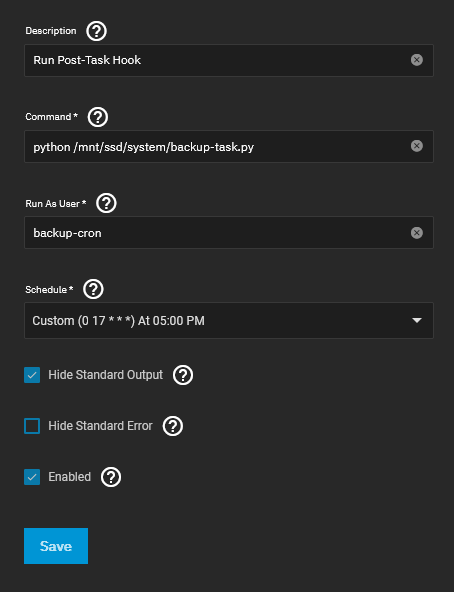
I added a dedicated user with limited privileges before and gave him access rights to the respective file only.
Disclaimer
While the method of using IPMI to start the remote server works, it is also a major security flaw. With access to IPMI an attacker that has access to the NAS could also damage the backup location rendering the backups useless. To overcome this, I was moving the IPMI accesses to a dedicated hardened VM that has limited network capabilites and just executes the respective IPMI commands (such as power on) once it receives a network request. This would worst-case allow an attacker to start the remote server which is nothing that could cause major damage.
Part 2: Creating the startup script
So, our server now creates snapshots and performs some local replications and afterwards starts our backup server via some call. What is missing is the replication of the remote server. For sure, we could push snapshots to the remote host, but from a security point of view I don’t like that idea and rather would like to pull these.
We can recycle some parts of the script we created before.
#!/usr/bin/python

import json
import subprocess
import sys
import time
from datetime import datetime, timedelta

def get_replications():
    result = subprocess.run(
        ["midclt", "call", "replication.query"],
        capture_output = True,
        text = True
    )

    return json.loads(result.stdout)

def is_recent(rep):
    state = rep["state"]["state"]
    if state == "ERROR":
        return True
    if state != "FINISHED":
        return False
    date_timestamp = int(rep["state"]["datetime"]["$date"])/1000
    date = datetime.fromtimestamp(date_timestamp)

    return date.date() == datetime.today().date()

# maximum time in hours that the process should wait
MAXIMUM_TIME = 6

end_time = datetime.now() + timedelta(hours=MAXIMUM_TIME)
is_ready = False

# while not all replicas / snapshots have been executed, wait
while True:
    replicas = get_replications()

    is_ready = True

    # if the replicas & snapshots are not from today, return
    for r in replicas:
        if not is_recent(r):
            is_ready = False
            break

    if is_ready:
        break

    if datetime.now() > end_time:
        break

    # sleep 3min
    time.sleep(60*3)

# so that we can disable it in case something unexpected happens
time.sleep(60*5)


if is_ready:
    subprocess.run(
        ["midclt", "call", "system.shutdown"],
        capture_output = True
    )
    print("Shutting down")
else:
    print("Error, did not finish in time")